.avif)
You’ve seen tags on blog posts. They’re simple labels that help you find related articles—a basic but effective way to organize content. Now, apply that same logic to your entire marketing content repository. That's the power of metadata. In Heretto, you can apply metadata tags to your files, creating a flexible content repository for labeling and organization that goes way beyond simple folders. This system helps you find content faster, filter search results, and learn more about your assets. It transforms your content into a true insights repository. In Heretto, there are two forms of metadata: CMS-level metadata and custom metadata.
## What is a Content Repository? A content repository is a centralized system where you store, organize, and manage all your digital files. Think of it as the single source of truth for your organization's content. If your team is dealing with a growing volume of documents, images, and other files, a repository helps keep everything secure and easy to find. It’s designed to bring order to the chaos of unstructured data, ensuring that everyone on your team is working from the same playbook and has access to the most current and approved materials. This is especially critical for technical documentation teams, where accuracy and consistency are non-negotiable. ### It’s More Than Just Cloud Storage While it might sound like a fancy term for cloud storage, a content repository is much more structured and powerful. Unlike a simple file-sharing service, a repository is built for active content management. It’s designed to work with your other tools to help you find, use, and publish your content with greater control and efficiency. Instead of just being a digital filing cabinet, it acts as an intelligent hub that understands the relationships between your content assets, supports complex workflows like reviews and approvals, and provides the foundation for a scalable content strategy. This structure is what separates a professional content tool from a basic storage solution. ## Key Business Benefits of a Content Repository Adopting a content repository goes far beyond just tidying up your files; it delivers tangible business results. By centralizing your content, you create a more efficient, consistent, and secure environment for your entire organization. This shift impacts everything from how quickly your team can produce documentation to how confident your customers feel about your products. It turns content from a simple operational cost into a strategic asset that drives collaboration, maintains brand integrity, and protects your valuable intellectual property. Let's look at some of the core benefits you can expect. ### Improved Efficiency One of the most immediate benefits is a significant gain in efficiency. A centralized repository drastically reduces the time your team spends searching for files, chasing down the latest versions, or recreating content that already exists. With everything in one place, workflows become smoother and collaboration improves. For technical writers, this means less administrative overhead and more time focused on creating high-quality, accurate documentation. When you can instantly find and reuse approved content components, you can assemble documents faster and respond to market needs with greater agility. ### Brand Consistency A content repository is your best defense against brand inconsistency. It brings all your content together, eliminating the confusion that arises when multiple versions of a document are floating around in different departments. By establishing a single source of truth, you ensure that everyone—from technical writers and marketers to sales teams and support agents—is using the right, most current information. This consistency is vital for building customer trust. When your user guides, knowledge base articles, and training materials all speak with one voice, it reinforces your brand’s reliability and professionalism. ### Better Collaboration and Partner Enablement Collaboration gets a lot easier when everyone is working from the same system. A content repository makes it simple for internal teams and external partners to work together seamlessly. Partners, resellers, and distributors can quickly find and use the marketing and technical resources they need without having to wait for someone to email them the right file. This self-service access empowers your entire network to represent your brand accurately and effectively. It removes bottlenecks and ensures that everyone who relies on your content has immediate access to the most up-to-date assets. ### Stronger Security and Compliance Protecting your intellectual property is crucial, and a content repository provides the robust security needed to do so. It safeguards your important information with strong features like granular access rules, version histories, and data encryption. You can control exactly who can view, edit, and approve content, ensuring that sensitive information is protected. This level of content governance is essential for maintaining compliance with industry regulations and internal standards, giving you a full audit trail of your content's lifecycle and minimizing risk. ## Essential Features of a Content Repository Not all content repositories are built the same. When you're evaluating your options, there are several essential features to look for that separate a basic storage tool from a true content management powerhouse. These capabilities are the building blocks of an efficient and scalable content operation. They ensure your team can not only store content but also track it, find it, secure it, and connect it to the other tools in your tech stack. A repository with these core features will support your team's growth and adapt to your evolving content needs. ### Version Control For any team that collaborates on content, version control is a must-have. It helps teams work together without overwriting each other's changes and provides a complete history of every document. If a mistake is made, you can easily roll back to a previous version. This feature is fundamental for documentation teams, as it creates a clear audit trail and ensures that you always know which version of a document was reviewed, approved, and published. It eliminates the confusion of file names like "Final_v2_final_final.doc" for good. ### Advanced Search and Filtering Your content is only valuable if you can find it. That’s why you need a repository with advanced search and filtering capabilities. The ability to find content quickly using metadata, tags, and other filters is a game-changer for productivity. Instead of digging through endless folders, your team can pinpoint the exact piece of content they need in seconds. For technical writers who rely on reusing specific components across hundreds of documents, powerful search is not just a convenience—it's essential for an efficient workflow. ### Access Control A good repository allows you to control who can see or change different pieces of content. With granular access control, you can set permissions based on user roles or team responsibilities. For example, you can give writers editing permissions, allow subject matter experts to comment and review, and grant read-only access to the sales team. This ensures that content is only modified by authorized users, which is critical for maintaining content integrity, security, and compliance with internal governance policies. ### Integration and API Access A content repository shouldn't be a silo. It needs to connect with the other systems your business relies on, from content management systems to translation platforms and publishing tools. Look for a repository with robust integration capabilities and API access. This allows you to create a seamless content ecosystem where information flows automatically between systems. For instance, you can push finalized content directly to your help portal or send it for translation with the click of a button, saving time and reducing manual errors. ### Scalability As your company grows, your content volume will grow with it. A good content repository must be able to handle an increasing amount of content without sacrificing performance. The system should be built to scale, supporting thousands or even millions of content assets and a growing number of users. This is especially important for enterprise organizations with extensive product lines and global documentation needs. Choosing a scalable solution ensures that your repository can support your business's long-term growth. ### Support for Multiple File Types Modern documentation is more than just text. A comprehensive content repository needs to store all kinds of digital files, including images, videos, diagrams, PDFs, and even 3D models. By keeping all related assets in one place, you ensure that your technical documentation is rich and engaging. This also simplifies asset management, as writers can easily find and insert the correct version of an image or video into their documents without having to search through separate systems. ## How Content is Structured in a Repository How you structure your content is just as important as where you store it. A well-organized repository relies on a logical system that makes content easy to manage, reuse, and publish. Instead of treating every document as a monolithic block of text, modern repositories break content down into smaller, more manageable components. This approach is powered by content models and structured content, which together create a flexible and highly efficient system for handling complex information at scale. ### Using Content Types and Fields At the heart of a well-organized repository are content types and fields. A content type acts as a blueprint or template that defines how a piece of information should be structured. For example, a "procedure" content type might have specific fields for a title, an introduction, and a series of steps. This approach ensures that all procedures are created consistently, no matter who is writing them. It moves you away from the free-form nature of traditional documents and into a more predictable and manageable content environment. #### The Role of Structured Content This blueprint approach is the foundation of structured content. Structured content is information that is organized in a predictable way, with specific fields for each piece of data. This is what makes content intelligent. When your content is structured, it becomes machine-readable, which unlocks powerful capabilities like content reuse, personalization, and automated multichannel publishing. For technical documentation, using a standard like DITA XML provides a robust framework for creating highly reusable and adaptable structured content, making it the gold standard for teams with large and complex content sets. ## Types of Repositories and How to Choose One Once you’ve decided you need a content repository, the next step is figuring out which type is right for your team. The market offers a range of options, from building a custom solution from scratch to buying a ready-made platform. You’ll also need to consider hosting, whether you prefer a cloud-based service or an on-premise installation. The best choice depends on your team’s technical resources, security requirements, and specific content needs. Making an informed decision here will set the foundation for your future content operations. ### Build vs. Buy The classic "build vs. buy" debate applies to content repositories as well. Building your own custom solution offers complete control over features and functionality, but it requires significant technical expertise, time, and ongoing maintenance resources. For most organizations, buying a ready-made solution is the more practical choice. A specialized platform like a Component Content Management System (CCMS) is faster to implement, comes with expert support, and is purpose-built with the features that technical documentation teams need to succeed. ### Hosting Options: Cloud vs. On-Premise You'll also need to decide between a cloud-based or on-premise repository. Cloud-based (SaaS) options are popular because they are easy to set up, scale automatically with your needs, and handle all the backend maintenance for you. On-premise solutions are hosted on your own servers, which gives you more direct control over data security and can be necessary for companies in highly regulated industries. However, they also require a dedicated IT team to manage server maintenance, updates, and security. ### Key Considerations When Choosing Ultimately, you should choose a system that fits your team's specific content needs. Before making a decision, consider a few key questions. What types of content will you be managing? How large is your team, and what are their technical skills? What other systems does the repository need to integrate with? Answering these questions will help you narrow down your options and select a repository that not only solves your current challenges but also supports your long-term content strategy. ## How to Implement and Organize a Repository Selecting the right content repository is only half the battle. A successful implementation depends on thoughtful planning, clear organization, and strong team adoption. Simply moving your existing files into a new system without a strategy will only replicate old problems in a new environment. To get the most value out of your repository, you need to establish a solid structure from the start, train your team on new workflows, and commit to ongoing maintenance and governance. ### Planning Your Structure and Taxonomy Before you migrate a single file, you need to plan your content structure and taxonomy. This means creating a logical system of folders, categories, and metadata tags that will make your content easy to find and manage. A well-planned taxonomy ensures that everyone on your team organizes content in a consistent way, preventing the repository from becoming a digital junk drawer. This upfront investment in planning is the most critical step toward building a clean, scalable, and user-friendly content hub. ### Migration and Team Training Once your structure is defined, you can begin migrating your content. This process should be paired with comprehensive team training. A new tool often requires new workflows, and it's essential to teach everyone how to use the repository effectively. Proper training ensures high adoption rates and helps your team understand the benefits of the new system. It’s a crucial step for change management and guarantees that you get the full return on your investment. ### Regular Maintenance and Governance A content repository is a living system that requires regular care. To keep it clean and effective, you need to establish a governance plan for ongoing maintenance. This includes processes for archiving outdated content, reviewing and updating metadata, and ensuring that everyone continues to follow the established organizational standards. Regular maintenance prevents content bloat, keeps search results relevant, and ensures your repository remains a reliable source of truth for years to come.What is Standard CMS Metadata?
CMS-level metadata is metadata that Heretto automatically assigns and tracks by Heretto as you create and interact with files. This allows you to navigate your content repository and create files without having to worry about manually tracking each file’s general metadata information. Heretto assigns and tracks the following metadata for each file:
- Last Modified Time
- Created Time
- Needs Attention
- Is Valid
- Contains Broken Links
- Contains Comments
- Owned by
- Locked by
- Status*
- Content Type
*Note: By default, users manually assign file statuses. However, with some configuration, statuses can be automatically assigned based on your Assignment Workflows. For example, resources in an assignment can be automatically assigned to the In Review or Approved statuses based on their stage in a workflow. For more information, contact your Heretto representative.CMS-level metadata provides general information about your content. Here are a few examples of how you can use metadata to learn about your content repository:
- What is the composition of your content repository? Do you have a high task-to-concept-topic ratio? You can use the Task and Concept metadata to find this information.
- Writer A is going on vacation, does she own any files that need to be transferred to another user? Or does she have any files locked to her? You can use the Owned by or Locked by metadata to find this information.
- How much of your repository is In Progress, In Review, Approved, or Needs Reevaluation? You can use the Status metadata to find this information.
Why Custom Metadata is a Game-Changer
Beyond the CMS-level metadata that is assigned and tracked in each instance of Heretto, you can also create custom metadata. Creating custom metadata enables you to create a tagging system that is unique to your organization so you gain specific insights about your content repository. Let’s talk about the custom metadata that we, Jorsek, create and use in our content repository. We assign metadata relevant to Heretto Interfaces, Marketing, Internal QA, and Content Maintenance. We consistently apply custom metadata to our content so that we can learn more about our content repository as it grows. Here’s a condensed list of custom metadata we can apply to our content:
- Heretto Interface
- Content Manager
- Browse Tab
- Bulk Change Window
- Collections Folder
- Context
- Context Map
- DITAVal Filter
- Dashboard
- Activity Interface
- Administration Interface
- Branching Manager
- Collections Interface
- Groups Interface
- Marketing
- Complexity
- Advanced
- Beginner
- Intermediate
- Persona
- Collaborator
- Manager
- Reviewer
- Writer
- Internal QA
- Failed
- Partially Passed
- Passed
- Content Maintenance
- Information Gap
- Obsolete
- Outdated
- Needs Improvement
Here are a few examples of how we use metadata to learn about our content repository:
- How many files do we have about the Browse Tab? We use the Browse Tab metadata to find this information.
- How many files failed our internal quality assurance process? We use the Failed metadata to find this information.
- How many files do in our repository have information Gaps we need to fill? We use the Information Gap metadata to find this information.
- How many files do we have about the Branching Manager that are written for Writers? We use the Branching Manager metadata and Writers metadata tag to find this information.
How Metadata Works in a Content Repository
Let’s look at how you can use CMS-level metadata and custom metadata in Heretto. You can use the Filters Tab to search your entire content repository, or focus on a specific folder. This tab enables you to use the CMS-level metadata and custom metadata to refine your search.
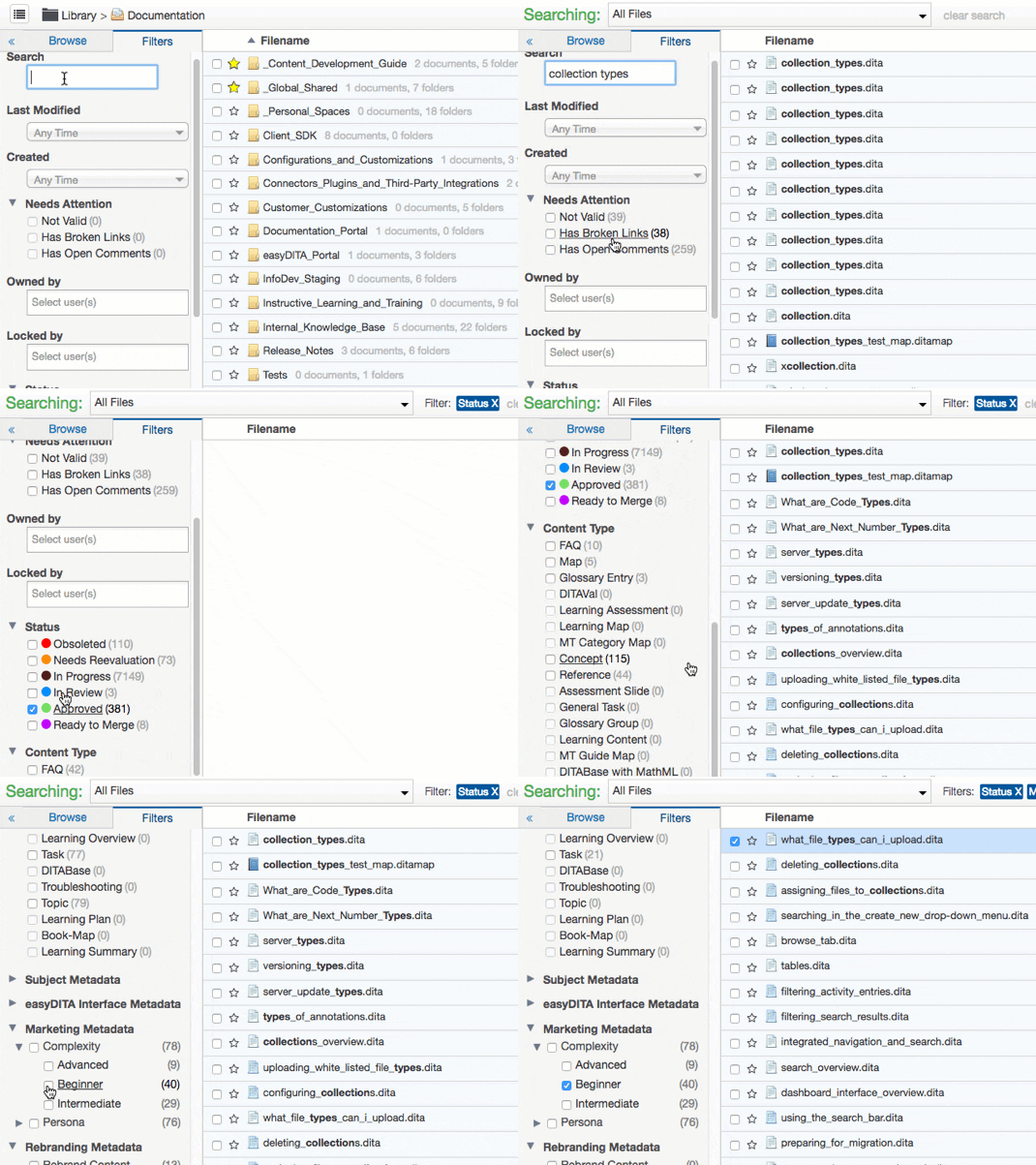
Using a combination of CMS-level metadata and custom metadata, you can gain the following insights:
- How many files about the Collections Interface are Approved? We use the Collections Interface metadata tag and the Approved metadata to find this information.
- How many task topics do we have about the Groups Interface? We use the Task metadata and the Groups Interface metadata tag to find this information.
- How many maps do we have for managers? We use the Map metadata tag and Managers metadata tag to find this information.
As your content repository grows, the ability to find content quickly, both internally as a team and externally as an end user, becomes critical. The CMS-level metadata that’s assigned and tracked automatically enables you to gain general insights about your content. But, it’s custom metadata that enables you to use Heretto’s powerful search and filter features to find relevant content and gain specific insights.
Designing Your Custom Metadata Schema
Custom metadata enables you to create metadata tags that identify information described in your files. You can create custom metadata using taxonomy or labels. Taxonomy Metadata requires you to configure a taxonomy of terms first, whereas you can create Label Metadata tags on the fly. We recommend using Taxonomy Metadata and taking the time to plan and create a taxonomy of terms. This ensures that your team uses consistent, predefined terms and doesn’t duplicate or use non-preferred terms. Taxonomy Metadata can contain hierarchy, where each term is a metadata tag that you can apply to your content. We recommend starting with a brain dump of all relevant keywords used to describe your content and consider other data points you might want from your content. When we created our taxonomy, we determined that the most relevant information was about:
- Heretto Interfaces - What interfaces are being written about? This makes it easier for us to find topics when we need to make updates.
- Marketing - What type of users will want this information? This makes it easier for us to determine if we have content that covers all our personas.
- Internal QA - Did this content pass or fail QA testing? This makes it easier for us to test our documentation and software.
- Content Maintenance - What is the health of our content? This makes it easier for us to evaluate and maintain our content.
Note: You can also import SKOS files that contain your pre-defined taxonomy into Heretto. You can build these files yourself or you can export them from a taxonomy tool, such as Pool Party, and upload them into Heretto.
How to Apply Metadata for Better Insights
Creating custom metadata is only part of a thorough metadata strategy. Consistently applying custom metadata to your content is the other part. Whether you already have a large content set in Heretto or you’re starting from scratch, you have several options when it comes to applying your custom metadata.
- You can assign metadata at the same time you create a file. This ensures that your metadata is applied right from the start.
- You can assign metadata after you create a file. Assigning it after creation ensures that the custom metadata reflects the finalized content.
- You can assign metadata in bulk to multiple files or maps (and their dependencies). Bulk assigning custom metadata is useful if you already have a large set of content in your repository and are just starting to use metadata.
For more information about creating a metadata strategy, see [Metadata Strategies].
Beyond Tagging: Building a True Insights Repository
We know that you spend a lot of time planning and writing your documentation. But it’s not really useful unless it’s consumed. And let’s face it, that won’t happen if no one can find your content. This is where metadata comes in handy.Not only is it useful internally to help team members find content quickly, but it can also help your end users. Depending on your delivery system, you can expose these metadata tags to your users so that when they search your online help, they can filter their results by the metadata you created.

Frequently Asked Questions
Isn't a content repository just a glorified cloud storage folder? Not at all. While cloud storage is great for holding files, a content repository is an active management system built for the entire content lifecycle. It includes critical features like version control, granular access permissions, and advanced search that you just don't get with a simple storage solution. Think of it as an intelligent hub for your content, not just a digital filing cabinet.
We have thousands of existing documents. How do we apply metadata to all of that without it taking forever? This is a common concern, and the key is to not treat it as an all-or-nothing project. A good system allows you to apply metadata tags to files in bulk, which saves a tremendous amount of time. You can start by tagging your most important or frequently used content first. Over time, you can build out your metadata as you update older files or create new ones, making the process manageable.
How do we get our team to actually use the metadata consistently? Success here comes down to planning and training. Before you start, work with your team to build a clear and logical taxonomy of terms. Using predefined taxonomy metadata, instead of letting people create labels on the fly, ensures everyone uses the same language. Once the system is set up, proper training that shows the team how much faster they can find and reuse content will help get everyone on board.
What's the real difference between using folders and using metadata tags for organization? Folders are a one-dimensional way to organize things; a file can only live in one folder at a time. Metadata is multi-dimensional. A single piece of content can have multiple tags, like "Beginner," "Writer," and "Branching Manager." This allows you to find the same file through many different search paths, making your content much more discoverable than if it were buried in a rigid folder structure.
Does this metadata actually help our customers, or is it just for internal organization? It absolutely helps your customers. While metadata is fantastic for internal efficiency, its real power is realized when you expose it to your end users. You can use these tags to create filters on your help site or knowledge base. This allows customers to narrow their search results and find the exact answer they need quickly, which creates a much better self-service experience.
Key Takeaways
- Establish a single source of truth: A content repository is a strategic tool, not just a digital filing cabinet. It centralizes your assets to streamline workflows, maintain brand consistency, and secure your intellectual property.
- Prioritize features that support structured content: The most effective repositories include version control, advanced search, and API access. These features are essential for managing complex documentation at scale and integrating with your other systems.
- Use custom metadata to gain valuable insights: Move beyond basic organization by creating a custom metadata taxonomy. A well-planned tagging system transforms your repository into an intelligent hub that makes content easy to find, manage, and analyze.