
.png)
.avif)
If you’ve ever felt frustrated trying to use a new product, you’ve experienced the impact of poor documentation firsthand. The best products feel intuitive because they are supported by clear, accessible content that anticipates your questions. This is the core mission of technical documentation: to bridge the gap between a complex system and the person trying to use it. It’s a conversation between your product and your user. A skilled technical documentation writer produces many types of documentation, from in-depth tutorials to quick-reference articles, to help create confident, successful customers.
At the heart of this process are technical writers who create a wide range of user guides to API documentation, they create content that informs, educates, and drives efficiency. In this article, we’ll dive into the various types of technical documentation that technical writers produce, showcasing how each type serves a unique and vital role in supporting users, developers, and businesses.
What is Technical Documentation?
At its core, technical documentation is the material that explains how a product or service works. It’s the bridge between a complex system and the people who need to use, maintain, or develop it. As Wikipedia puts it, "Technical documentation is a general term for information that describes how a product, system, or service is used, what it does, or how it's built." This includes everything from the user manual for a new piece of software to the intricate API guides that developers rely on to build integrations. The goal is always the same: to translate technical information into clear, accessible, and actionable content for a specific audience.
Effective documentation serves as a single source of truth, ensuring everyone from end-users to internal engineers is working with the same information. It reduces ambiguity and empowers people to solve problems independently. To achieve this, modern documentation teams rely on centralized systems to manage their content, making sure that every guide, tutorial, and reference article is consistent, accurate, and easy to find. This organized approach turns documentation from a simple reference file into a dynamic and essential part of the product experience, building user confidence and competence.
The Benefits of Great Technical Documentation
Investing in high-quality technical documentation pays off in numerous ways, impacting both your customers and your internal teams. It’s not just about having a help file; it’s about building a strategic asset that reduces support load, accelerates product adoption, and preserves valuable company knowledge. When documentation is clear, accurate, and easy to access, it becomes a powerful tool for growth and efficiency. It directly addresses user questions, smooths out learning curves, and ensures that critical information is captured and shared effectively across the organization. Let's look at a few key benefits.
Improves Product Adoption and Developer Experience (DX)
First impressions matter, especially when a user or developer is trying your product for the first time. If they can't figure out how to use it, they're likely to abandon it. This is where documentation plays a critical role. According to one source, "Good technical documentation is very important for a good 'developer experience' (DX)." A positive developer experience means that developers can easily understand and use your software or API, which is essential for adoption. Clear guides, well-documented code samples, and intuitive tutorials reduce friction, helping all users achieve their goals faster and see the value in your product sooner.
Streamlines Onboarding for New Team Members
Great documentation isn't just for customers; it's also a massive asset for your internal teams. When new employees join, they have a lot to learn about your products, systems, and internal processes. Comprehensive documentation acts as their guide, allowing them to find answers independently instead of constantly relying on senior team members. This self-service approach leads to "Faster Onboarding: New team members learn internal processes quicker." It empowers new hires to become productive faster and frees up your experienced employees to focus on more complex work, making the entire team more efficient.
Creates a Collective Company Memory
Employees come and go, but their knowledge shouldn't have to leave with them. Technical documentation serves as a living record of your company's expertise, decisions, and processes. As one expert noted, "It acts as your company's memory, so important knowledge doesn't leave when someone does." This collective memory protects your organization from knowledge loss and ensures that future teams can build upon past work without having to reinvent the wheel. Strong content governance ensures this memory stays accurate and relevant, making your organization more resilient and less dependent on any single individual.
Types of Product Documentation
While technical documentation is a broad field, it generally falls into two main categories: product documentation and process documentation. As AltexSoft explains, "Product Documentation: Describes the software itself and how to use it," while process documentation focuses on internal workflows and standards. For most users and developers interacting with your company, product documentation is what they’ll see and use most often. It’s the public-facing content that guides them through your offerings and helps them succeed. This is where a structured approach to creating content becomes essential for clarity and consistency.
Product documentation comes in many forms, each designed to serve a different purpose and audience. Here are some of the most common types you'll encounter:
- User Guides: These are comprehensive manuals that cover the features and functions of a product in detail. They are designed for end-users who want to understand everything a product can do.
- API Documentation: This is a critical resource for developers. It provides all the information they need to interact with your software programmatically, including endpoints, parameters, and example code.
- Release Notes: These documents inform users about updates, new features, bug fixes, and improvements in the latest version of a product. They keep your audience current with the product's evolution.
- Knowledge Bases: A knowledge base is a searchable library of articles, FAQs, and troubleshooting guides. It’s designed for users who have a specific question and need a quick, direct answer.
- Tutorials: Unlike user guides that explain features, tutorials are goal-oriented. They provide step-by-step instructions to help users accomplish a specific task from start to finish.
1. User Manuals and Guides: Helping Users Help Themselves
User guides are essential for helping end-users understand how to use a product or system. They offer step-by-step instructions, making it easy for users to follow along and complete specific tasks.

These guides enhance user experience and reduce the need for customer support by providing clear and concise information. Examples of user guides include manuals and help guides that cover various features and functions of a product.
2. API Documentation: Your Developer's Guide to Integration
API documentation is crucial for developers who need to integrate with an application programming interface (API). It includes detailed instructions on how to use the API, covering:
- Functions
- Classes
- Return types
- Arguments
This type of documentation helps developers understand how to effectively use the API, facilitating third-party integrations and developer engagement. Examples include API references and integration guides, which provide the necessary information to make requests and handle responses. Creating accurate technical documentation in software development is crucial.
3. SDK Documentation: The Toolkit for Developers
SDK documentation guides developers on how to use software development kits. It includes:
- Installation instructions
- Feature descriptions
- Code samples
This type of technical documentation is vital for developers building applications on specific platforms.
Clear SDK documentation ensures that developers have all the necessary information to efficiently use the SDK, which ultimately enhances the quality and functionality of their applications. Examples include SDK setup guides and various code samples that demonstrate how to implement features.
Product Requirements Document (PRD)
A Product Requirements Document, or PRD, is the foundational guide that outlines what a product should do. It acts as a single source of truth for the entire team—from developers to marketers—by clearly defining the project's goals, features, and scope. The PRD typically includes user stories that describe how people will interact with the product and, just as importantly, specifies what features are intentionally left out. This clarity ensures everyone is aligned on the vision and works toward the same outcome, preventing scope creep and misunderstandings down the line. A well-defined PRD is the first step in creating structured content that will support the product throughout its lifecycle.
Software Architecture and Design Documents
While a PRD explains the "what," software architecture and design documents explain the "how." These documents serve as the technical blueprint for the product, detailing its underlying structure, the main components, and how they all interact. Think of it as the architectural plan for a house; it shows where the walls go, how the plumbing connects, and what the electrical grid looks like. This documentation is essential for developers to build a stable and scalable system. It also helps new team members get up to speed quickly and ensures that future development decisions are consistent with the original design principles, making it a critical asset for managing complex technical information.
Source Code Documentation
Source code documentation consists of comments and explanations written directly within the code itself. These notes are created by developers, for developers, to clarify the purpose and logic behind specific lines or blocks of code. It explains the "why" behind a particular implementation, which is often not obvious from reading the code alone. This type of documentation is invaluable for long-term maintenance, debugging, and collaboration. When a new developer joins the team or when someone has to revisit a piece of code months later, these comments make the codebase much easier to understand and modify without breaking things. It’s a practical application of the principles behind DITA, where structure and clarity are paramount.
Types of Process Documentation
Beyond documenting the product itself, it's equally important to document the processes used to create it. Process documentation describes how your team works, outlining the standards, workflows, and plans that guide development from start to finish. This can include everything from coding standards and version control procedures to project plans, test schedules, and meeting notes. Having these processes written down ensures consistency across the team, makes onboarding new members more efficient, and provides a clear framework for project management. It creates a shared understanding of responsibilities and expectations, which helps projects run more smoothly and predictably.
Effective process documentation is a cornerstone of strong content governance. When your team’s operational standards are clearly defined and accessible, it’s easier to maintain quality and alignment as the team grows and projects evolve. This documentation acts as a reference point for decision-making and helps prevent knowledge from being siloed with individual team members. By centralizing these resources in a Component Content Management System (CCMS), you can ensure that everyone is working from the most current information, which reduces errors and improves overall efficiency. This creates a more resilient and scalable operation for any technical team.
4. System Administration Guides: The IT Pro's Playbook
System administration guides provide instructions for maintaining and configuring systems. These guides are essential for system administrators who need to ensure smooth operations and security. They typically cover:
- Installation procedures
- Maintenance tasks
- Configuration settings
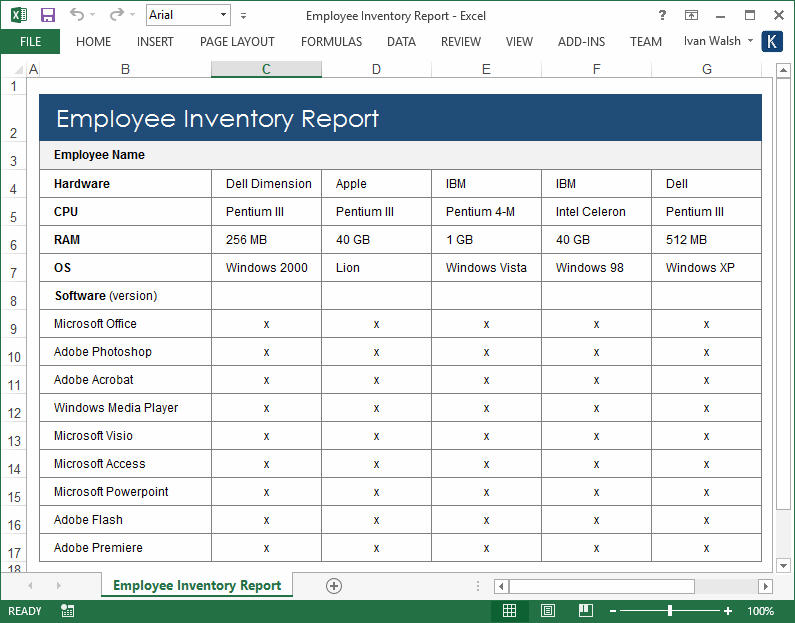
Effective system administration documentation helps prevent downtime and security breaches by providing clear and detailed instructions. Examples include installation guides and maintenance manuals that outline best practices for system upkeep.
5. Process Documentation: Creating a Single Source of Truth
Process documentation outlines internal processes and workflows, ensuring consistency and compliance within an organization. This type of documentation is crucial for standardizing operations and helping team members understand their roles and responsibilities.
It includes detailed instructions on how to perform specific tasks, making it easier for employees to follow established procedures. Examples of process documentation include standard operating procedures (SOPs) and process maps that provide a visual representation of workflows.
6. Project Documentation: Keeping Everyone Aligned
Project documentation provides detailed plans and progress reports for various projects. It helps keep projects on track and ensures that all team members are aligned with the project goals. This type of documentation typically includes:
- Objectives
- Scope
- Timelines
- Resources

By having clear project documentation, teams can monitor progress, identify potential issues, and make necessary adjustments. Examples include project charters and status reports that outline key milestones and deliverables.
Agile Process Documents
Unlike traditional methods that require extensive documentation upfront, the Agile approach treats documentation as a living entity. It evolves alongside the project, with teams creating and updating content iteratively within each sprint. This flexibility ensures that documentation remains relevant and useful, focusing on teamwork and quick responses to change rather than rigid, pre-defined plans. This approach works best when content is modular, allowing writers to update components quickly without overhauling entire documents. The goal is to provide just-in-time information that supports the development process, not hinder it with outdated requirements.
7. Business Standards Documentation: Ensuring Consistency
Business standards documentation includes policies, procedures, and benchmarks that guide business operations. This documentation ensures that all employees follow consistent practices and adhere to company standards and industry regulations.
By having clear business standards, organizations can maintain quality and compliance, which is essential for smooth operations and legal protection. Examples include company policies that outline acceptable behaviors and compliance guidelines that ensure adherence to industry standards and regulations.
8. Quality Assurance Documentation: The Path to a Better Product
Quality assurance (QA) documentation outlines plans and checklists for product testing. It ensures that products meet quality standards and function as intended before release. QA documentation typically includes test plans, test cases, and QA reports. These documents help teams systematically:
- Test products
- Identify issues
- Implement necessary fixes
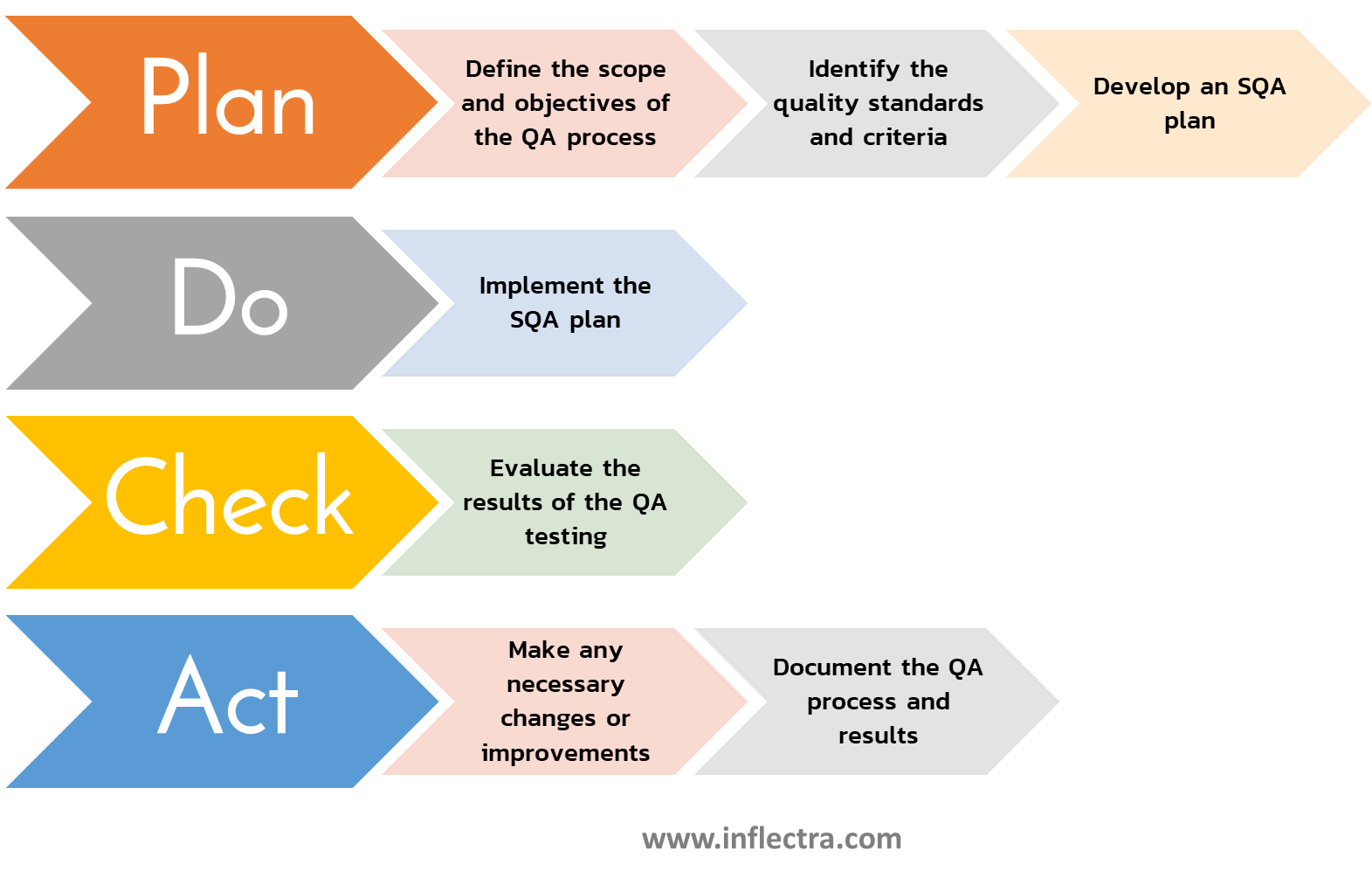
By having comprehensive QA documentation, organizations can deliver reliable and high-quality products. Examples include detailed test plans that describe testing phases and methods, and QA reports that document the results of these tests.
9. Marketing and Sales Documentation: Aligning Your Go-to-Market Teams
Marketing and sales documentation supports efforts to attract and retain customers by explaining the value proposition of a product or service. These materials help potential customers understand how a product can meet their needs and solve their problems.
Effective marketing and sales documentation can also build trust and credibility with the audience. Examples include white papers that offer in-depth analysis and case studies that showcase real-world success stories. Additionally, requests for proposals (RFPs) and proposals detail how a vendor can meet project needs, outlining methodologies, timelines, and costs.
10. UAT Documentation: The Final Check Before Launch
User Acceptance Testing (UAT) documentation is crucial for validating that a product meets user requirements and works as intended in real-world scenarios. This type of documentation includes:
- Test plans
- Test cases
- UAT reports
UAT documentation helps ensure that the final product is user-friendly and free of significant issues before it goes live. It involves end-users testing the product in a controlled environment and providing feedback.
Examples of UAT documentation include detailed test plans outlining the scope and objectives of the testing phase and UAT reports summarizing the findings and any necessary corrective actions.
Frameworks for Structuring Your Content
Great documentation isn’t just well-written; it’s well-organized. A solid structure makes information easy to find and digest, which is the whole point. Instead of reinventing the wheel, you can lean on established frameworks to guide your content strategy. These models provide a blueprint for organizing information in a way that anticipates user needs, ensuring they can find the right answer in the right format, whether they’re trying to learn a concept from scratch or solve a specific problem.
Choosing a framework helps standardize your approach, making the documentation process more efficient for your team and the final product more intuitive for your users. It creates a predictable and reliable experience, which builds trust and encourages self-service. Let’s look at two popular and effective frameworks for structuring technical content.
The Diátaxis Framework
The Diátaxis framework is a popular model that organizes documentation into four distinct types based on user intent. It recognizes that users approach documentation with different goals in mind. The framework suggests creating tutorials for learning-oriented tasks, how-to guides for goal-oriented problem-solving, reference materials for detailed information lookup, and explanations for deepening understanding of concepts. By separating content this way, you cater to the full spectrum of user needs, from the beginner who needs step-by-step guidance to the expert who just needs to look up a specific parameter.
Topic-Based Authoring with DITA
Topic-based authoring, particularly with DITA (Darwin Information Typing Architecture), breaks content down into small, reusable modules or "topics." This approach is incredibly efficient for managing large volumes of documentation. DITA defines five core topic types: Task, Concept, Reference, Glossary Entry, and Troubleshooting. Each topic is self-contained and focuses on a single subject, allowing you to mix and match them to build different documents. This modularity ensures consistency, simplifies updates, and makes it easy to publish content across multiple channels from a single source.
The Team Behind the Documentation
Technical documentation is rarely a solo effort. It’s a collaborative process that involves input and expertise from various roles across an organization. While a technical writer might be the one putting the words on the page, they rely on a network of subject matter experts to ensure the information is accurate, relevant, and complete. This team effort brings together different perspectives—from the high-level business goals to the granular technical details—to create a final product that serves its audience effectively.
This collaboration is essential for bridging the gap between the product’s creators and its users. Developers provide the technical accuracy, project managers ensure alignment with project goals, and UX designers offer insights into user behavior. When these roles work together, the documentation becomes more than just a set of instructions; it becomes an integral part of the user experience.
Core Roles in Documentation Creation
Creating comprehensive documentation requires a village. The team often includes Business Analysts who define requirements, Project Managers who keep everything on track, and Solution Architects who design the system. Developers and QA Engineers are crucial for providing and verifying the technical details. Even UX Designers play a part by ensuring the documentation is presented in a user-friendly way. Each person contributes a piece of the puzzle, ensuring the content is not only technically correct but also aligned with business objectives and user needs.
Specialized Writing Roles
At the center of this collaborative effort is the Technical Writer. Their primary job is to take complex information from all these different sources and translate it into clear, concise, and easy-to-understand content. They are the voice of the user, always asking, "Does this make sense? Is this helpful?" A skilled technical writer knows how to structure information logically, write with precision, and edit ruthlessly to remove ambiguity. They are specialists in communication, ensuring the final documentation empowers users rather than confusing them.
The Documentation Creation Process
Creating high-quality technical documentation follows a structured process, much like software development itself. It’s a cycle of planning, drafting, and refining that ensures the final output is accurate, useful, and easy to maintain. Following a defined process helps teams work efficiently and consistently, avoiding the common pitfall of treating documentation as a last-minute task. Each step builds on the last, from understanding who the audience is to ensuring the content remains relevant long after it’s published. This methodical approach turns documentation from a chore into a strategic asset.
Step 1: Analyze the Audience and Gather Information
Everything starts with the audience. Before you write a single word, you need to know who you’re writing for. Are they developers, administrators, or end-users? What’s their level of technical expertise? What are they trying to accomplish? Answering these questions helps you tailor the content’s tone, language, and depth to meet their specific needs. Once you understand your audience, you can gather the necessary information from subject matter experts, existing documents, and the product itself to ensure your content is comprehensive and accurate.
Step 2: Structure the Content Logically
With your audience and information in hand, the next step is to organize it logically. This is where frameworks like Diátaxis or DITA come in handy. A good structure guides the user through the information smoothly. For example, you might start with tutorials for new users, followed by conceptual explanations, and then provide detailed reference guides for advanced users. A logical flow makes content more discoverable and less intimidating, helping users find what they need quickly without getting lost in a sea of text.
Step 3: Write with the 5 C's (Clarity, Conciseness, Cohesiveness, Completeness, Correctness)
When you start writing, focus on the five C’s. Be clear by using simple language and active voice. Be concise by getting straight to the point and avoiding unnecessary words. Ensure the content is cohesive, with each part flowing logically into the next. Make sure it’s complete, covering everything the user needs to know to succeed. Finally, guarantee it’s correct by verifying every technical detail. Adhering to these principles ensures your documentation is professional, trustworthy, and genuinely helpful to the reader.
Step 4: Use Visuals to Enhance Understanding
Words alone aren’t always enough. Visuals like screenshots, diagrams, flowcharts, and videos can make complex information much easier to understand. A well-placed screenshot can show a user exactly where to click, while a flowchart can clarify a complicated workflow in a single glance. Visuals break up long blocks of text, making the content more engaging and accessible. They serve as powerful aids that complement the written word and cater to different learning styles, ultimately improving comprehension and user satisfaction.
Step 5: Review, Get Feedback, and Update
Documentation is never truly "done." Once the first draft is complete, it needs to be reviewed for technical accuracy by subject matter experts. It’s also crucial to get feedback from your target audience through user testing. This feedback loop helps you identify areas of confusion and make improvements. After publishing, the work continues with regular updates to keep the content in sync with product changes. Strong content governance and a commitment to maintenance ensure your documentation remains a reliable resource over time.
Integrating Documentation into Your Development Lifecycle
The most effective documentation isn’t created in a vacuum after a product is finished; it’s developed right alongside it. Integrating documentation into your development lifecycle transforms it from an afterthought into an essential part of the product itself. When documentation is part of the process from the beginning, it stays more accurate, relevant, and useful. This approach ensures that by the time the product is ready to ship, the supporting content is ready too, providing a seamless experience for users from day one.
Documentation in Agile vs. Waterfall
Your development methodology influences your documentation strategy. In a traditional Waterfall approach, comprehensive documentation is often created upfront before development begins. In contrast, Agile methodologies favor a more iterative approach. Documentation is created and updated in small chunks within each sprint, evolving along with the product. While Waterfall can result in very detailed but potentially outdated documents, the Agile method ensures the documentation is always current, though it requires continuous effort to maintain and organize.
Making Documentation a Team Habit
To make documentation a sustainable practice, it needs to become a habit for the entire team. This means including documentation tasks in every sprint or project plan. Set aside time not just for writing but also for reviewing and testing the content. By making documentation a defined part of your team's "definition of done," you ensure it receives the attention it deserves. This cultural shift treats documentation as a feature of the product, just as important as any line of code.
Common Challenges in Creating Documentation (and How to Solve Them)
While everyone agrees on the importance of good documentation, creating and maintaining it comes with a set of common challenges. Teams often struggle with finding the time, possessing the right skills, and keeping content from becoming obsolete. These hurdles can make documentation feel like a constant uphill battle. However, by acknowledging these challenges head-on and implementing practical solutions, you can build a sustainable and effective documentation workflow that delivers real value to your users and your business.
Challenge: It's Too Time-Consuming
Let's be honest: writing good documentation takes time and effort. It’s often one of the first things to get pushed aside when deadlines are tight. The solution is to treat documentation like any other critical project task. Plan for it from the beginning. Allocate specific time for writing and review in every project release or sprint. When documentation is a scheduled part of the workflow, it’s far more likely to get done—and done well.
Challenge: It Requires Specialized Writing Skills
Not everyone is a natural writer, and that’s okay. Technical accuracy is one thing, but communicating it clearly is another skill entirely. If your team lacks strong writing skills, the documentation can end up confusing or unhelpful. The most direct solution is to bring in a specialist. Hire a dedicated technical writer or borrow one from another department. Their expertise in communication and content structure is invaluable for turning raw technical data into polished, user-friendly documentation.
Challenge: It Gets Outdated Quickly
In a fast-moving development environment, documentation can become outdated almost as soon as it’s published. A product change that isn’t reflected in the docs can lead to user frustration and support tickets. The best way to solve this is to involve technical writers directly in the development process. When writers participate in each sprint, they stay informed of changes as they happen and can update the documentation in real-time, ensuring it always reflects the current state of the product. This is where managing structured content effectively becomes critical.
Challenge: It Requires the Right Tools
Using the wrong tools can make documentation a frustrating and inefficient process. Trying to manage complex, interconnected content in standard word processors or wikis often leads to inconsistencies and maintenance headaches. The solution is to invest in tools designed for the job. A proper documentation system helps you create, manage, and publish content efficiently. The right platform can support content reuse, version control, and multi-channel publishing, saving your team significant time and effort.
Choosing the Right Tools for the Job
Having the right tools can make all the difference between a documentation process that’s a chaotic mess and one that’s a well-oiled machine. The ideal toolset supports your team’s workflow, from initial drafting and collaboration to final publishing and ongoing maintenance. It should help you enforce consistency, facilitate reuse, and deliver content to your users wherever they are. Investing in the right technology is investing in the quality and efficiency of your entire content operation, ensuring your documentation can scale with your product.
Component Content Management Systems (CCMS)
For teams managing large amounts of technical documentation, a Component Content Management System (CCMS) is a game-changer. A CCMS allows you to manage content as modular components or "topics" rather than as large, monolithic documents. This approach makes it incredibly easy to reuse content across different guides, manuals, and help sites, ensuring consistency and dramatically reducing the effort required for updates. When you need to change a product detail, you update one component, and the change automatically populates everywhere that component is used.
API and UX Design Tools
Beyond a core management system, specialized tools can streamline the creation of specific documentation types. For API documentation, tools that can generate reference docs directly from the source code or OpenAPI specs are invaluable. They ensure accuracy and save developers significant time. Similarly, UX design tools can be used to create visual aids, mockups, and flowcharts that make user guides and tutorials more effective. Integrating these specialized tools into your workflow helps produce higher-quality, more user-friendly documentation.
Turn Your Technical Documentation into a Company Asset
Technical writers create various types of documentation that are crucial for enhancing user experience, supporting development, and ensuring quality. From user guides and API documentation to business standards and quality assurance documents, each type plays a vital role in the success of products and services. By understanding and effectively utilizing these types of technical documentation, organizations can achieve better efficiency, compliance, and customer satisfaction.
Heretto revolutionizes content management with features like Component Content Management System (CCMS) for creating, managing, and publishing content from a single source. Enjoy seamless version control, dynamic content reuse, and robust metadata management.
Ready to enhance efficiency and compliance? Get started today by booking a demo or learn more about Heretto.
Frequently Asked Questions
What’s the main difference between product and process documentation? Think of it this way: product documentation is for your customers, while process documentation is for your internal team. Product documentation, like user guides and API references, explains how to use the product itself. Process documentation, such as project plans or coding standards, outlines how your team builds and maintains that product. Both are essential, but they serve completely different audiences.
My team is small. Which type of documentation should we prioritize first? Start with the content that will have the biggest impact on your users and your support team. A searchable knowledge base or a set of clear user guides are often the best places to begin. These resources empower users to solve their own problems, which directly reduces the number of support tickets your team has to handle. Focus on answering the most common questions first.
Why is a content framework like DITA or Diátaxis so important? A framework provides a blueprint for organizing your information logically. Without one, documentation can quickly become a disorganized collection of articles that are difficult for users to follow and for your team to maintain. Frameworks like DITA help you create consistent, reusable content, which saves time and ensures every piece of documentation serves a clear purpose for the reader.
How can I convince my company to invest more in technical documentation? Frame the conversation around business value. High-quality documentation is not a cost center; it's a strategic asset. Explain how it reduces the burden on your support team, helps new customers get up to speed faster, and preserves critical knowledge when employees leave. When you connect documentation directly to efficiency and customer retention, it becomes a much easier investment to justify.
What's the real difference between a user guide and a tutorial? A user guide is like an encyclopedia for your product; it comprehensively explains what every feature does. A tutorial, on the other hand, is like a recipe; it provides step-by-step instructions to help a user achieve a specific goal. Users turn to guides to understand a feature, but they use tutorials to accomplish a task.
Key Takeaways
- Treat documentation as a core product feature: Quality documentation is not an afterthought; it directly improves product adoption, simplifies employee onboarding, and preserves valuable company knowledge.
- Implement a structured content strategy: Use a consistent creation process, from audience analysis to final review, and apply frameworks like DITA to organize information logically for different user needs.
- Solve challenges with the right tools and habits: Overcome common issues like outdated content by integrating documentation into your development lifecycle and using a Component Content Management System (CCMS) to keep information accurate and easy to maintain.


